




%20(1)-Oct-14-2026-03-04-44-3197-PM.png?width=750&height=450&name=RedBeam%20Blog%20Photos%20(1000%20x%20600%20px)%20(1)-Oct-14-2026-03-04-44-3197-PM.png)




RFID Warehouse Management: How It Works and Where to Start
Summary • 18 minutes read
Share


%20(1)-4.png?width=1062&name=RedBeam%20Blog%20Photos%20(1000%20x%20600%20px)%20(1)-4.png)
You know radio-frequency identification (RFID) can cut cycle count time. You've seen the case studies. But finance asks for ROI numbers. IT wants to know how it connects to your warehouse management system (WMS). Without clean answers, the conversation stalls.
That's where RFID warehouse management gets complicated. Most resources explain what the technology is. Few explain how tags, readers, and middleware connect to your WMS across receiving, putaway, picking, and shipping. That knowledge is key.
When you understand how those three layers work together, you can map RFID to your actual workflows. You can build a case your finance and IT teams will accept. And you can run a pilot that proves value before you commit to a full deployment.
Main Takeaways
- RFID warehouse management runs on three connected layers: tags, readers, and middleware that feeds your WMS automatically.
- Passive tags work for most warehouse operations. Active and semi-passive tags are only worth the higher cost in specific environments.
- RFID earns its ROI at four workflow stages: receiving, putaway, picking, and shipping, each with distinct hardware placement and WMS update logic.
- A full deployment typically runs from the low five figures for a single-zone pilot to the mid six figures for multi-site coverage, driven by facility size, read zones, and integration complexity.
- Starting with a single dock door pilot, measuring against a baseline, and expanding only after validation is the lowest-risk path to full deployment.
|
Pick the Right RFID Software for Your Stack Connecting tag reads to WMS updates is where most RFID projects stall. This guide covers the API features, event logic, and cloud vs. on-prem tradeoffs that determine whether your system actually works. |
How RFID Works in a Warehouse: Tags, Readers, and Middleware
The system works through three connected layers. Tags identify each item, and readers capture those identities wirelessly. Middleware then cleans the data before it reaches your WMS. Together, these layers replace manual scanning with automatic, real-time inventory updates. Here's what each one does.
- Tags. Small chips with antennas attached to pallets, cases, or individual items. Each tag stores a unique identifier. It transmits that ID via radio waves when a reader's signal reaches it.
- Readers and antennas. Fixed devices (such as Zebra enterprise fixed readers) mounted at dock doors, aisle ends, or portals. Associates also carry mobile readers (such as Zebra handheld RFID scanners) for on-the-go scanning. Both types capture tag signals across a defined read zone.
- Middleware. Software sitting between your readers and your WMS. It filters duplicate reads, resolves conflicts from overlapping zones, and translates raw tag events into structured inventory updates.
Those three layers also explain why RFID works differently from barcode systems. The difference comes down to scale and line of sight. RFID reads hundreds of tags per second without a direct visual path. Barcodes require one-at-a-time scanning with a clear sightline. That's the core reason RFID scales in a warehouse.
Which Tag Type Fits Your Operation: Passive, Active, and Semi-Passive
Tag choice is the first hardware decision you'll make. It depends on three factors:
- How far you need to read
- What surfaces your tags sit on
- How much each tracked item is worth
|
Factor |
Passive |
Semi-Passive |
Active |
|
Read range |
Up to 10 to 12 m (30 to 40 ft) |
Up to 30 m (100 ft) |
100+ m (300+ ft) |
|
Cost per tag |
$0.04 to $0.25 |
$2 to $15 |
$15 to $50+ |
|
Power source |
None (powered by reader signal) |
Battery-assisted sensor, reader-activated |
Onboard battery, self-broadcasting |
|
Best environment |
Standard pallets, cases, cartons |
Temperature-sensitive goods, moderate-range assets |
Yard trailers, high-value mobile equipment |
|
Common warehouse use |
Pallet and case tracking, cycle counts, receiving verification |
Cold-chain monitoring |
Trailer tracking, large outdoor yards |
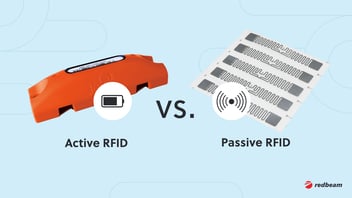
For most warehouse operations, passive ultra-high-frequency (UHF) RAIN RFID tags complying with the EPC Gen2 (ISO/IEC 18000-63) standard are the default. They're cheap enough for case-level and pallet-level tagging. They also cover the read ranges you need inside a facility. Most operators reserve active tags for assets that move across large outdoor areas or need continuous location broadcasting. Semi-passive tags earn their higher cost when you need onboard sensors for temperature or humidity.
One important caveat: if your inventory touches metal or liquids, specify on-metal or flag-style tags with built-in spacers. According to GS1, standard RFID tags can struggle in these environments. Metal reflects the signal and liquid absorbs it, so a tag pressed against either one loses read range. Tags designed for those surfaces restore it.
RFID Across Four Warehouse Workflows: Receiving, Putaway, Picking, and Shipping
RFID earns its ROI at four specific workflow stages. Across all four, the return comes from the same three places: labor you stop spending on manual scans, errors you catch before they compound, and inventory records that match what's actually on the floor. What changes at each stage is what gets read automatically, where the hardware sits, and which record updates without a person touching it. The section after this one covers how those reads reach your WMS.
A note on scope before we get into it. RFID captures what moved, where, and when. Your WMS decides what should move next. Those are different jobs, and the four workflows below describe where RFID data enters the picture, not where it replaces the system you already run.
Receiving: Where Automated Verification Compresses Dock-to-Stock
Tagged pallets or cases pass through a fixed reader portal at the dock door. The reader captures every tag in the shipment at once. No associate needs to break down the pallet or scan items one at a time. Middleware compares the read list against the advance ship notice or purchase order in your WMS.
Mismatches like short shipments, wrong SKUs, or unexpected items surface right away, before product moves deeper into the facility. This automated inbound verification is what compresses dock-to-stock time. Best-in-class distribution centers target dock-to-stock under 3.5 hours, order accuracy of 99.68% or higher, and on-time shipments of 99.5% or higher, according to WERC's DC Measures benchmarking study. Those three numbers are the bar your RFID business case has to move you toward.
Putaway: Where Location Accuracy Prevents Downstream Recounts
After receiving, the associate moves product to a storage location. A handheld reader or zone-mounted reader confirms the tag matches the assigned putaway location in the WMS. If the associate places a pallet in the wrong bay, the system flags the mismatch in real time. That prevents picking errors and phantom inventory, where your records show stock in a location that doesn't have it, which forces a recount to resolve.
Picking: Where Read Data Validates What Left the Shelf
During order picking, readers at pick zones or on carts capture each pick event. Your WMS compares those reads against the order record and flags anything that doesn't match. The pick logic stays where it already lives. What RFID adds is a read that happens without anyone stopping to scan.
Cycle counting is where the labor math is clearest. One associate with a handheld reader can walk a zone and capture hundreds of tags in minutes, with no need to shut down aisles for manual scanning. Counts update automatically, and the gap between your records and your shelves stops widening between physical inventories.
Shipping: Where the Last Read Catches Errors Before They Cost You
At the shipping dock, fixed readers capture every tagged item in an outbound load. Comparing that read list against the manifest catches mis-ships and shortages before the trailer door closes.
That last read matters more if you're tagging to meet a retail mandate. Encoding errors and bad tag placement, which can be minimized using enterprise print/encode hardware like Zebra RFID printers, are a live compliance risk. Suppliers who get them wrong face chargebacks from the retailer, as RFID Journal reported in a 2024 account of one supplier meeting Walmart's requirements. A dead tag caught at your dock is a cheap problem. The same tag caught at your customer's dock isn't.
Worth knowing: that supplier's fix was quality control at the point of tagging, not at the dock. Verifying encoding when tags are applied catches the errors earliest. Your outbound read is the backstop, not the first line of defense.
|
Track Every Pallet From Dock to Storage Misplaced pallets and manual location updates create the exact inventory gaps RFID is built to close. See how RedBeam pushes container and pallet location data directly to your WMS via REST API. |
How RFID Connects to Your WMS
Middleware is what turns raw RFID reads into usable WMS records. Understanding that data path is key to evaluating whether RFID fits your current software stack.
It's also where the division of labor becomes clear. We don't replace your WMS. RedBeam acts as enterprise RFID middleware, integrating natively with Zebra hardware via the Zebra IoT Connector to absorb, filter, and normalize raw tag reads before pushing clean operational data into your WMS via REST APIs. Pick and pack sequencing, slotting logic, and order fulfillment stay where they are. What changes is that the records those processes depend on stop being updated by hand.
The full read-to-record flow works in three steps:
- A reader captures a tag's unique ID and timestamps the event.
- Middleware filters out duplicate reads and resolves conflicts from overlapping zones. It structures the event data into what was read, where, when, and why.
- Middleware pushes that structured event to your WMS via API. The inventory record (location, status, quantity) updates without manual entry.
The event-data format that unifies this information across systems is EPCIS 2.0. It became an ISO standard in March 2024 (ISO/IEC 19987:2024). EPCIS gives warehouses a common language for read events so different systems can share data reliably.
What to Ask Your Vendor About WMS Compatibility
Before you commit to any RFID vendor or WMS provider, verify these compatibility questions:
- Does the middleware support REST API integration with your specific WMS platform?
- How does the system handle event filtering? Can you set rules for which reads trigger WMS updates versus which are logged but not acted on?
- What WMS and ERP platforms has the vendor already integrated with?
- Does the vendor support both cloud and on-premise WMS deployments?
- What happens to read data if the WMS connection drops? Is there local buffering?
- What security certifications does the platform hold, and where does read data live?
That last question is the one IT will ask first, and a lot of RFID vendors don't have a clean answer. Ours is a SOC 2 Type II certified platform built on Google Cloud. Ask for the report. A vendor who can't produce one is asking your IT team to take a lot on faith.
What an RFID Deployment Costs
There's no single price for an RFID warehouse deployment, and any vendor who gives you one before walking your facility is guessing. What you can do is build your own estimate from four variables you already know: how many dock doors need coverage, how many read zones you need beyond those doors, how many items you're tagging, and how much integration work your WMS requires.
Here's what each piece contributes.
Hardware. Fixed enterprise readers (such as Zebra fixed readers) and antennas at each read zone, Zebra handheld readers for pick and putaway, and tags. Fixed readers typically run $1,000 to $4,000 each, with the low end reflecting negotiated pricing on enterprise hardware and the high end covering more antenna ports and tougher environmental ratings. Handhelds run $1,500 to $3,000, and antennas $150 to $300. Passive tags land at the low end of the range in the tag table above once you're buying at volume. Tags are the line item that scales with your inventory, and readers are the line item that scales with your floor plan.
Software. RFID middleware and tracking platform licensing, either subscription or perpetual.
Integration. API development, WMS and ERP connector configuration, and testing. This is the line item that varies most between operations. A modern WMS with documented REST APIs costs a fraction of what a legacy or heavily customized system does.
Ongoing maintenance. Tag replenishment, hardware support, software updates, and periodic system tuning. Tag replenishment is the recurring cost people forget to model.
Rough shape: a single-zone pilot at one dock door is a low five-figure project. A mid-size facility with four to ten dock doors and handhelds for pick and putaway runs into the low six figures. Full multi-site coverage with dense reader infrastructure and custom integration work runs higher than that. Get quotes rather than budgeting off any published range, including this one.
For context on where this sits in a broader technology budget, the 2024 MHI Annual Industry Report, produced with Deloitte, found that 55% of supply chain leaders are increasing their technology and innovation investment. Of those, 88% plan to spend over $1 million and 42% plan to spend over $10 million. Against numbers like that, RFID isn't competing as a standalone line item anymore.
When RFID Isn't the Right Call
RFID isn't right for every warehouse, and knowing where it breaks down is part of building a case your finance team will believe. Five situations where the math doesn't work, or doesn't work yet:
Your inventory is mostly metal or liquid. On-metal and flag-style tags solve this, but they cost several times what a standard label costs. If most of what you track sits on metal, run that premium across your full tag count before you build a business case. Sometimes it still works. Sometimes it doesn't.
Your item value is too low to justify the tag. A tag that costs 20 cents on a case worth four dollars is a different decision than the same tag on a pallet worth four thousand. Tagging at the case or pallet level rather than the item level often fixes this, but if your operation genuinely needs item-level visibility on low-value goods, the per-unit math may not close.
Your WMS can't take the data. A legacy system without documented APIs turns integration from a configuration task into a custom development project. That cost can exceed the hardware. Find out what your WMS actually supports before you price anything else.
Your volume is low enough that barcode already works. RFID's advantage is bulk reads. If your team scans a few dozen items a day and nobody is waiting on the process, the labor savings won't cover the investment. Barcode is the right tool at that scale, and it costs a fraction as much.
You can't commit to the process change. This is the one that sinks deployments that looked fine on paper. If associates don't trust the reads, they revert to manual scanning and you've bought hardware that duplicates work instead of replacing it. Training and process discipline aren't optional line items.
If two or more of these describe your operation, run the pilot smaller and prove the value before you scale. That's what the roadmap below is for.
How to Start: A Phased RFID Implementation Roadmap
The lowest-risk way to implement RFID is a phased rollout. Start with a single workflow in a single zone. Validate results against your current baseline. Expand only after you've proven the system works with your actual inventory, infrastructure, and team.
Phase 1: Pilot Zone Selection and Baseline
Choose one high-impact, contained workflow for the pilot. Receiving is the most common starting point because the dock door is a natural read-zone chokepoint. It also offers clear before-and-after metrics:
- Dock-to-stock time
- Advance Ship Notice (ASN) match rate
- Manual scans per shipment
Before you install anything, establish your current baseline. How long does receiving take today? What's your inbound accuracy rate? How many scans does each shipment require? These numbers become the benchmark your pilot has to beat.
Install one or two fixed readers at the pilot dock door. Tag a typical sample of inbound product. Then configure middleware to push reads to your WMS.
Phase 2: Validate, Train, and Expand
Run the pilot for four to eight weeks. Compare RFID-captured data against your baseline and ask three validation questions: Are read rates consistent, targeting above 95% first-pass reads? Is the middleware filtering duplicates correctly? Are WMS records updating accurately?
Three failure points show up most often in pilots. Each has a simple fix:
- Poor reader placement. Readers mounted too high, too low, or at wrong angles create dead zones. Test placement with loaded pallets, not empty docks.
- Tag interference. Metal racking or liquid-heavy products cause tags to lose read range. Switch to on-metal or flag-style tags for those SKUs (see tag selection above).
- Weak staff training. Associates bypass the system or revert to manual scans when they don't trust it. Invest in hands-on training before go-live.
After validation, expand to the next workflow stage. For most operators, that's typically putaway or shipping. Add read zones step by step. Each expansion follows the same baseline, install, validate, and train cycle.
Full facility rollout typically takes three to six months after a successful pilot. Budget four to eight weeks for the pilot phase itself. Total timeline from first reader install to full deployment is typically five to nine months.
Build the Right RFID Warehouse Management Strategy
RFID warehouse management works best when you treat it as an operational improvement, not just a technology purchase. You now have a framework for evaluating tag types, reader placement, and WMS integration. You also understand deployment costs, the situations where RFID doesn't pay off, and how to roll it out in phases. That puts you in a stronger position to compare vendors, build a realistic budget, and decide whether RFID is the right fit for your warehouse.
We help warehouses connect RFID data to the systems that keep inventory moving. Our team works with you to plan deployments, integrate with your WMS, and validate performance before you scale. As a Zebra Premier ISV Partner with 3,500+ deployments and over 2 billion RFID reads processed, we've done this in facilities that look like yours. That's Tracking Made Easy™.
|
Run Your Pilot With a Proven RFID Team A single dock door pilot is the lowest-risk way to validate RFID in your facility. Our team helps you set baseline metrics, configure readers, and prove ROI before you scale. |
FAQs About RFID Warehouse Management
Do I Need to Replace My WMS to Use RFID?
No. RFID middleware connects to your existing WMS through REST APIs. Middleware sits between the readers and your WMS. It translates tag reads into inventory updates your system already understands. You add RFID tracking on top of your current system without replacing it or migrating data. Verify your WMS supports API connections. Ask any RFID vendor which platforms they've already integrated with.
How Long Does It Take to See ROI From RFID?
Most operations see measurable ROI within six to 12 months of full deployment. The biggest drivers are labor savings from faster cycle counts, reduced search time, and fewer shipping errors. Pilot results usually validate those ROI assumptions within four to eight weeks. Receiving and cycle counts deliver the clearest early wins because they replace the highest-labor manual workflows first.
What Happens if RFID Tags Get Damaged or Stop Working?
Damaged or non-functional tags show up as missed reads during routine scans. Your middleware flags them so you can replace the tag before the asset moves to the next workflow stage. Passive tags have no battery to fail. Damage is usually physical: a torn inlay or crushed antenna from rough handling. For high-value or critical assets, run periodic read-rate checks at receiving and shipping to catch dead tags early.
Can RFID Work in Cold Storage or Freezer Environments?
Yes. RFID works in cold storage and freezers. You'll need tags and readers rated for low temperatures and condensation. Standard passive tags can fail or read poorly below certain temperatures. Specify cold-rated tags when ordering hardware for refrigerated or frozen zones. If your operation requires both location tracking and temperature monitoring, semi-passive tags with onboard sensors are the right fit despite their higher per-tag cost.
How Do I Handle RFID Interference From Metal Racking or Liquid Products?
Use on-metal tags or flag-style tags with built-in spacers for assets on metal surfaces or near liquids. Standard passive tags lose read range when placed directly against metal or high-water-content materials, according to GS1. Test tag placement during your pilot with actual loaded pallets and real racking configurations. If interference persists, adjust reader angles or add read zones to cover blind spots from dense metal structures.
%20(2)-2.png?width=352&name=RedBeam%20Blog%20Photos%20(1000%20x%20600%20px)%20(2)-2.png)